Tables, kitchen, food cost and the books for every branch.
Run the floor and the kitchen, know your food cost per dish, close each branch's cash every night, and see all branches from your phone.
Try it free for 30 days: your own private demo portal with sample data. We set up your real data only when you sign.
Which branch sold the most this month?
- BGC₱480,487
- Tomas Morato₱448,068
- Kapitolyo₱394,417
What changes when you switch
BeforeYou find out about food cost problems at month end.
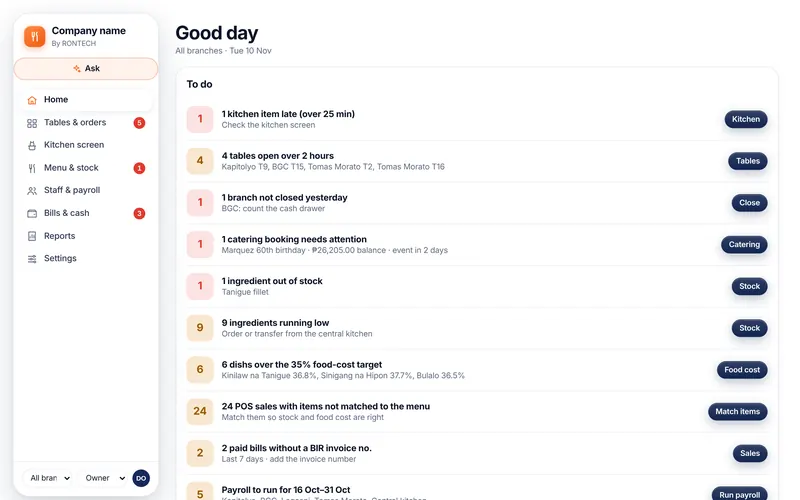
With RONTECHRecipes per dish, so every sale updates ingredient stock and food cost. Dishes over your target are flagged on Home.
BeforeBranches don't close the cash drawer properly.
With RONTECHA daily closing per branch: count the drawer, compare with sales, explain the difference. Unclosed branches show on Home.
BeforeCatering deposits and balances get lost in chat.
With RONTECHCatering bookings with deposits, balances and the event date, with reminders before the event.
BeforeYour POS and your books don't match.
With RONTECHConnect your BIR-accredited POS. Sales come in with their invoice numbers and still update stock, closing and the books.
Everything in one portal
Tables and orders
Dine-in, takeout and delivery orders by table and branch.
Kitchen screen
Dishes in order, with late ones flagged.
Recipes and food cost
Ingredient cost per dish and your target food-cost percent.
Stock per branch
Ingredients, transfers from the central kitchen, and counts.
Catering
Bookings with deposits, menus and balances.
Daily closing
Cash count per branch, with the difference explained.
POS connection
Keep your BIR-accredited POS; sales flow into the portal.
Reports
Sales by branch, dish and hour, and profit per branch.
A screen for each person on your team
Everyone logs in with Google or a code sent to their mobile number, and sees only their part.
- OwnerSales per branch, food cost, cash, and anything late or not closed.
- AccountingBills, payroll, VAT per branch, and matching POS sales to the books.
- Cashier & serversOrders by table, bills, and payments by cash, card, GCash or Maya.
- Branch managerTheir branch only: staff, stock counts, the kitchen and the nightly closing.
- Kitchen crewThe kitchen screen: what to cook next and what's running late.
Philippine taxes and payroll, in plain words
Taxes and BIR
- Senior and PWD discount: 20% off and no VAT on the senior's or PWD's own share of the bill
- VAT or non-VAT per branch, filed per branch the way BIR expects
- Service charge tracked and shared with staff as the law requires
- Bills printed by the portal say “not an official invoice”; the BIR invoice comes from your accredited POS or invoice booklet
- Business, sanitary and other permit expiry dates remind you on Home
Payroll
- SSS, PhilHealth, Pag-IBIG and withholding tax on pay worked out every payroll
- Minimum wage checked for the days worked; a top-up is added when someone falls below it
- Overtime, night hours, rest-day and holiday pay
- 13th month pay, paid and unpaid leave, and final pay when someone leaves
- A payslip for every person; paid payroll is locked
- Service charge shares can be added to each payroll.
Tax settings follow current Philippine rules and can be switched per branch. Please confirm your setup with your accountant.
Open the demo and look around
The demo runs on sample data in your browser. Switch between the owner, staff and field views. Start on Home: it lists what needs doing today, each with a button to fix it.
Try it free for 30 days
Your own private demo portal with sample data. We set up your real data only when you sign.
Other industries
Book a demo or start a free trial
Tell us about your business. We'll walk you through the portal for your industry, or send you your own private demo portal to try for 30 days.
We got your request.
Use the form and we'll get back to you.
Try it free for 30 days: your own private demo portal with sample data. We set up your real data only when you sign.